SJSTechnet

Free Microsoft 365 security assessment

How secure is your Microsoft 365, really?

Most Microsoft 365 breaches start with a setting nobody changed: MFA that isn't enforced everywhere, an admin account without strong sign-in, or mail quietly forwarding outside the company. We check your tenant's configuration against recognised security baselines and tell you what to fix first.

What we check

Hundreds of automated checks, grouped into six areas

Every check looks at how things are configured, never at your data. Here's what each area covers.

Sign-in and MFA

  • MFA enforced for every user, not just some
  • Phishing-resistant MFA for administrators
  • Legacy sign-in methods that bypass MFA are blocked
  • Conditional Access policies and their gaps
  • Risky sign-in and risky user policies
  • Self-service password reset and password protection

Admin accounts and roles

  • How many Global Administrators you have
  • Standing admin rights versus just-in-time access
  • Admin accounts that are cloud-only and protected
  • Emergency (break-glass) access accounts
  • Guests or external users holding roles

Email protection

  • Automatic forwarding of mail to outside addresses
  • Anti-phishing and impersonation protection
  • Safe Links and Safe Attachments policies
  • SPF, DKIM and DMARC on your domains
  • Mailbox auditing and modern authentication

Apps and consent

  • Whether users can approve apps on their own
  • Third-party apps with broad permissions
  • App registrations with expiring or risky credentials

Sharing and guests

  • Who can invite guests, and what guests can see
  • SharePoint and OneDrive external sharing defaults
  • Anyone-with-the-link sharing
  • Teams external and guest access

Devices, logging and alerts

  • Unified audit logging is switched on
  • Device compliance policies and how sign-in uses them
  • Security alerts and who receives them
  • Microsoft's own security recommendations for your tenant

Standards

Mapped to the frameworks auditors use

Results also help answer the Microsoft 365 questions on cyber insurance applications and SOC 2 or ISO 27001 readiness reviews.

  • CIS Microsoft 365 Foundations Benchmark
  • CISA Secure Cloud Business Applications (SCuBA) baselines
  • Microsoft Entra security recommendations

Read-only

What read-only means here

You stay in control of access the whole time, and you can remove it whenever you like.

What we can see

  • Security settings and policies across your tenant
  • Which accounts hold admin roles, and how they sign in
  • Sharing, guest and app permission settings
  • Mail flow and protection settings

What we never do

  • Read email, files, chats or Teams messages
  • Change, add or delete anything
  • Sign in as any of your users
  • Receive or store any password

How access works

  1. We email your administrator a short access pack with step-by-step instructions.

  2. They run one script on a Windows PC. It creates a temporary read-only app in your tenant, using the Global Reader role. No password is shared: it signs in with a certificate that's unique to your assessment.

  3. Access expires automatically after 30 days. Your administrator can remove it sooner with one command, and we ask them to once the report is delivered.

  4. Prefer not to run anything? Your administrator can sign in live on a 30-minute screen share instead, and nothing is left behind.

What you receive

A report you can act on

A graded report

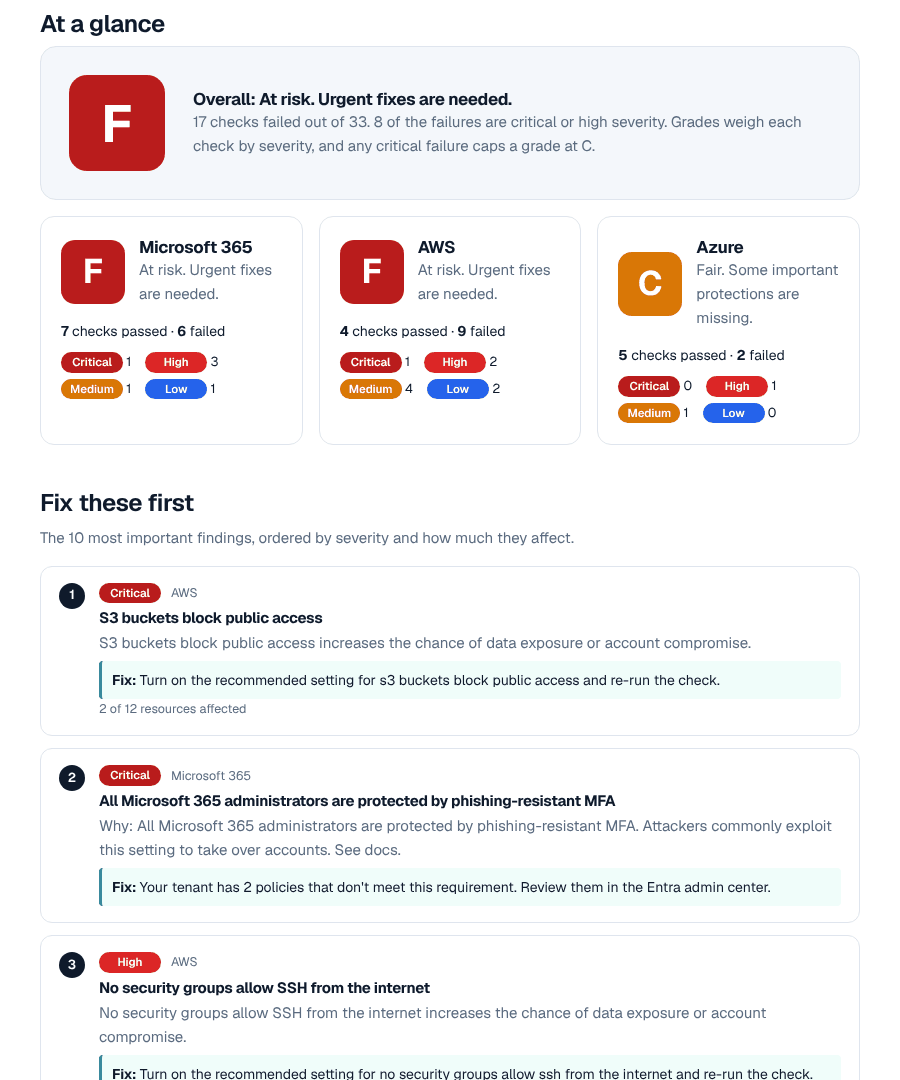
An A to F grade for each area, written for the person who signs the cheques, with the technical detail attached for whoever runs IT.

Fix these first

The ten findings that matter most, each explained in plain language: what it is, why it matters, and how to fix it.

Compliance snapshot

How your settings line up against each framework we check, so you know where you stand before an audit or insurance renewal.

A 30-minute walkthrough

We go through the report with you on a call and answer questions. Any fixes are quoted at a fixed price, only if you want them.

Sample page from an SJSTechnet security report, showing an overall grade, grades per area and the top findings
Sample report with made-up findings.

Questions

Common questions

Is it really read-only?

Yes. The access we ask for can only read settings. It can't change anything, and it's limited to configuration, not your data. The section above lists exactly what we can and can't see.

Will it affect our users or slow anything down?

No. We read configuration through Microsoft's standard administration interfaces. Nothing is installed on your devices, and users won't notice anything.

Who needs to run the setup?

A Global Administrator, on any Windows PC. It takes about five minutes.

Do you need our licences to be a certain level?

No. Some checks only apply if you have features like Conditional Access or Defender for Office 365; where you don't, the report tells you what those features would add.

We already have an IT provider. Is this still useful?

Yes. It's an independent check of the settings, and the report is something your provider can work from.

What does it cost?

The assessment is free. If you'd like help fixing what we find, each fix is quoted at a fixed price before any work starts, and you're never obliged to go ahead.

How long until we get the report?

Within two business days of your administrator finishing setup. We then book a 30-minute call to walk you through it.

Book your free Microsoft 365 assessment

Tell us a little about your setup and we'll send everything your administrator needs.

Book your free assessment